New From Google Book Search!
You know, big guys make me nervous. Sometimes, they get a monopoly, and throw their weight around, making you and me pay more for less and less service.
Not Google.
I love Google. I love Google searches, I love GoogleEarth, and oh man, I love Google Book Search. And this is so totally cool – look what they are coming up with now!
Google Book Search in Google Earth
Monday, August 20, 2007 at 11:54 AM
Posted by Brandon Badger, Product Manager
Did you ever wonder what Lewis and Clark said about your hometown as they passed through? What about if any other historical figures wrote about your part of the world? Earlier this year, we announced a first step toward geomapping the world’s literary information by starting to integrate information from Google Book Search into Google Maps. Today, the Google Book Search and Google Earth teams are excited to announce the next step: a new layer in Earth that allows you to explore locations through the lens of the world’s books.
Now when you turn on the “Google Book Search” layer in Google Earth (found in the “Featured Content” folder in the “Layers” menu), you’ll see small book icons scattered around the globe. When you click on one of the book icons, a pop-up balloon will display a snippet of text from one of Book Search’s public domain books that references that location. You’ll also find links to the Google Book Search page for that snippet so that you can learn more about what it has to say about the city or town.
For example, let’s say that you’re interested in Detroit, Michigan.
You can find out more by clicking here.
Have fun!
(Sorry, can’t write more! Have to go do some book searches! Thanks, Earthling!)
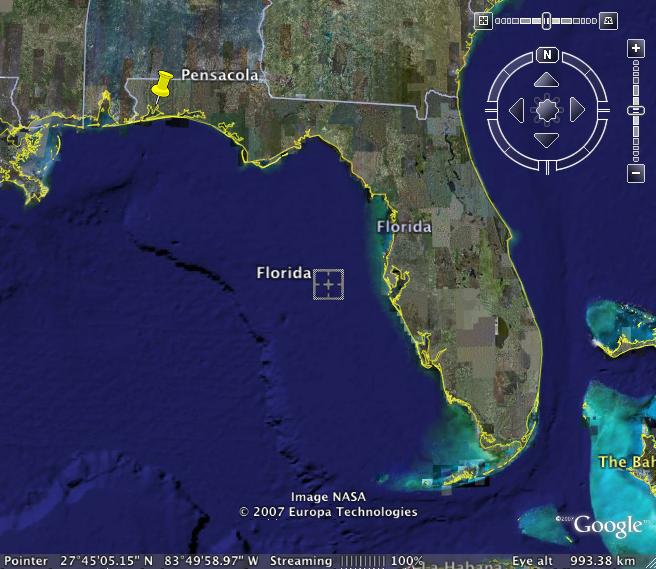
Where is Pensacola, FL?
It isn’t only my Kuwaiti friends . . . . many of my American friends don’t know where Pensacola is, either.
Pensacola is almost in Alabama.
You can see it at the far left of the map. It has a big bay, and a barrier island with a gorgeous, white sand beach. It is fairly unspoiled, as Florida goes, with more moderate temperatures, and some slight shift in seasons.
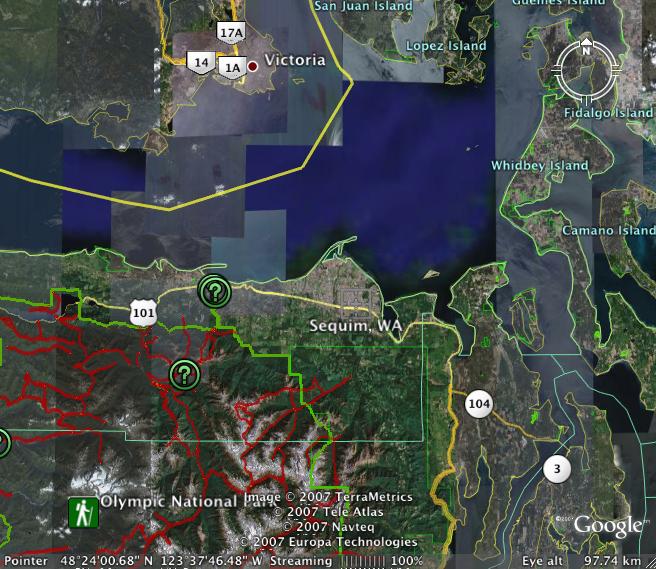
Sequim and Dungeness on Google
I know you guys explained in detail how to post maps. I know you even used small words, easy words, but somehow, I can’t make it work your way. I guess I need a workshop or something.
But I CAN go on GoogleEarth and SaveImage. It works for me, and I can use it here to share with you where the prior photos are taken on the trip to Sequim and Dungeness.
This is the map of the Sequim/Dungeness area. Dungeness is the spit up at the top where some of the sweetest crabs in the world live and die to feed our hearts and souls. If you ever get a chance to drive on the Olympic Peninsula, you will want to do so. It is not crowded, and the scenery is totally awe inspiring. There are Indian reservations selling Indian art, fields and fields of lavender, fresh fruits and vegetables, farms of all kinds, and views of the Puget Sound. Even in rainy weather, it is gloriously beautiful.

Here you can see Sequim and the Dungeness Spit as part of the larger area:
Rules of Engagement
As you know, I am from a very close, very funny family. Earthling, my nephew, just got engaged.
We’ve all been waiting. Almost from the beginning, we knew this girl was THE ONE. We almost always know. They announced their engagement by sending a series of photos of a hike they took near Google Valley in California, including the photo of the bride-elect and her new ring. We are dancing for joy, that these two dear people have found one another and are committing their futures to one another.
And – the bride-to-be has started a blog called Rules of Engagement. She is a very funny, very clever writer, and will take you step by step through the travails of an American style wedding.
Enjoy!
GoogleEarth – Make Your Own Maps
You, too, can make your own maps, and get where you need to go, thanks to GoogleEarth. If you are a landmark driver, like me, this will make your day.
A friend gave me a map to her house that blew my mind – it was a GoogleEarth map, with lines and arrows and landmarks – everything I need when I am driving. I could see the roundabouts! I could see the major landmarks! I knew EXACTLY where to turn, which mosque where I would turn right, and which field to drive across.
She said her husband had done it; she didn’t know how. I opened GoogleEarth and figured it out. Now – oh my! I have maps to everywhere! It is so totally cool!
You open Google, find EXACTLY the image you need to use for your map (be sure your major landmarks are in the frame) and you go to File on the toolbar and scroll down to Save – there is an arrow, and you choose Save Image.
You open your drawing program – in my case, Appleworks, but it will work with your drawing program, too.
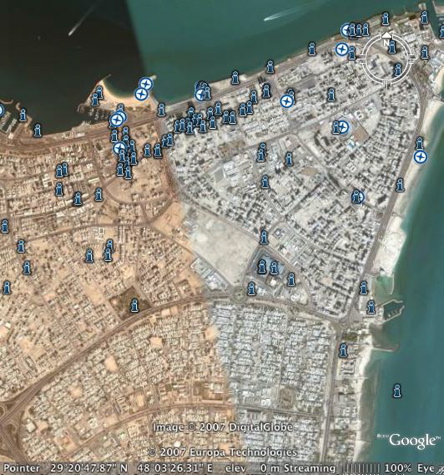
You paste your map into your drawing program, and then you add your arrows showing the route to take, and you add text identifying the landmarks, and perhaps writing out the directions.
And then you print. It’s that easy. And holy smokes, the maps are totally usable.
New Google Earth Hi Res
New high resolution:
Canada:
Whistler, BC; Waterloo & Toronto, Ontario; Nanaimo, BC; and Fort Saskatchewan, AB
England: Base 50cm coverage of nearly entire country, and Avon
Germany: Cities/Regions of Greifswald, Trier, Köln, Stuttgart, Bonn, Oldenburg, Rostock, Saarbrücken, Hamburg, Hannover, and Ritterhude
Austria: Villach region
France: Cities of Caen, Dijon, Metz, St Etienne, Toulouse and Rouen
Spain: Valencia Andorra
US: Imperial County (CA); Yellowstone National Park (WY); Galveston/Houston (TX); Peterborough (NH); Cheyenne (WY); Burke, Wake, and Cabarrus Counties (NC); Racine and Kenosha Counties (WI); Washington, DC; St Paul (MN); and the State of Alabama
Japan: City/Regions of Kochi, Asahikawa, Koriyama, Miyazaki, Nagano, Utsunomiya, Akita, and Toyama
Large Digital Globe (60cm) update includes areas in Sudan, expanded Africa, Australia, Mexico coverage and smaller areas of coverage in Asia, Polynesia, South America, Canada, Europe, Middle East plus some interesting islands in Antarctica and Greenland.
Updated Imagery:
Americas:
Bogotá, Columbia; Mission Viejo (CA, US); Hillsborough County (FL, US)
EU: Dublin, Ireland
Middle East/Africa: Beirut, Lebanon and Tripoli, Libya
Asia: Hong Kong and Manila, Philippine
Updated Terrain:
Western US 10m, Canary Islands 10m
Google Street View Peeping?
I found this article on AOL, but it is from the New York Times originally.
Google Zooms In Too Close for Some
By MIGUEL HELFT, The New York Times
The New York Times
OAKLAND, Calif. (June 2) – For Mary Kalin-Casey, it was never about her cat.
Google said it takes privacy seriously and considered the implications of its service before it was introduced. “Street View only features imagery taken on public property,” it said.
Ms. Kalin-Casey, who manages an apartment building here with her husband, John Casey, was a bit shaken when she tried a new feature in Google’s map service called Street View. She typed in her address and the screen showed a street-level view of her building. As she zoomed in, she could see Monty, her cat, sitting on a perch in the living room window of her second-floor apartment.
“The issue that I have ultimately is about where you draw the line between taking public photos and zooming in on people’s lives,” Ms. Kalin-Casey said in an interview Thursday on the front steps of the building. “The next step might be seeing books on my shelf. If the government was doing this, people would be outraged.”
Her husband quickly added, “It’s like peeping.”
Ms. Kalin-Casey first shared her concerns about the service in an e-mail message to the blog Boing Boing on Wednesday. Since then, the Web has been buzzing about the privacy implications of Street View — with varying degrees of seriousness. Several sites have been asking users to submit interesting images captured by the Google service, which offers panoramic views of miles of streets around San Francisco, New York, Las Vegas, Miami and Denver.
On a Wired magazine blog, for instance, readers can vote on the “Best Urban Images” that others find in Street View. On Thursday afternoon, a picture of two young women sunbathing in their bikinis on the Stanford campus in Palo Alto, Calif., ranked near the top. Another showed a man scaling the front gate of an apartment building in San Francisco. The caption read, “Is he breaking in or has he just locked himself out?”
Google said in a statement that it takes privacy seriously and considered the privacy implications of its service before it was introduced on Tuesday. “Street View only features imagery taken on public property,” the company said. “This imagery is no different from what any person can readily capture or see walking down the street.”
You can read the rest of the article on AOL MOney News by clicking here.
My comment: I am a huge fan of transparency, so you might think this new ability wouldn’t bother me. But the transparency I favor is transparency of business and government transactions, not people taking in my behavior in my own house! I am also a huge fan of personal privacy, and while a street view that just shows my cat in the window wouldn’t be alarming, it tells me that photos shot at night, which would show the interior of my residence, are also possible, and that thought troubles me very much.
Our homes are our castles! If my husband wants to walk around in his underwear (or less 😉 ) and I want to wear my nightgown all day when I am working on a special project, honestly, it is not YOUR business, nor anyone else on the internet! Do you want photos published, taken of you unaware in your own house? This capability is terrifying!
Tornado Before and After
Imagery provided in Ogle Earth of the recent tornado damage in Greensburg, Kansas on May 4th.
If you go to Ogle Earth, you can see the before and after shots. The destruction is unbelievable. The immediacy with which the damage could be assessed with the help of these shots helps emergency workers and insurance assessors do their job more quickly.

Welcome, Earthling!
The commenter on this blog known as Earthling, now has his own blog under his own name. A geographer with GoogleEarth, he has frequently given info and tips on Google Earth which I have passed along to you.
His blog is a hoot. Matt is a picky eater, surrounded at Google by free, high quality food in huge abundance and variety, and that is what he is blogging about. Maybe he will also show their on-site laundry and gym facilities 😉
In spite of his self-proclaimed picky eating habits, Matt is a very good cook, a creative cook, and I always loved it when I could hear him puttering around in the kitchen because something good was going to come out of it all. His one food addiction is hot peppery sauces, and his Jambalaya is so fiery I can’t eat but a bite or two.
Here is a Matt story (every family has these stories):
One day Matt’s Mom was making dinner when Matt, about fifteen at the time, walked in and asked “what’s for dinner?” She told him. Twenty minutes later the delivery man from a local restaurant pulled up and rang the doorbell – Matt’s dinner had arrived. Matt’s Mom was dumbfounded, and then laid down the law – if she was going to all the trouble of fixing dinner, her family would eat it! No delivery!
You can find him HERE at Google-Food-Spot.
Check in and give him a big welcome, please.
Google Earth Fantasy Flight
The same good friend who shared the quotes with me, sent this connection yesterday to an 8 minute video compiled with music by a GoogleEarth fan who takes you to some of the oddities you can see with the high resolution of GoogleEarth, including sunbathers and what I can only describe as EarthArt.
Recent Comments
ExpatAlien on What Country am I Living … intlxpatr on Yellowstone: Old Faithful to C… Michelle on Yellowstone: Old Faithful to C… Cathy on No Grown-Ups in Charge intlxpatr on Waiting for Snow Wikipedia Donate Button

Amazina


Early Voting in Florida


 Here There and Everywhere